
Theme Gallery

Ready-made dark and light palettes with HEX values, a small interface preview for each one and CSS you can copy in a click. Pick a mood, copy the colours and test them in the Contrast Checker.

A browser window split into a dark and a light page, a palette icon and a short list of HEX colour codes
12 themes

Midnight Amber

Dark

The look of this site: warm amber on soft charcoal.

Text contrast 15.2:1 · AAA

Graphite

Dark

Neutral grey with a cool teal accent, good for docs and code.

Text contrast 14.9:1 · AAA

Deep Forest

Dark

A green-tinted dark that stays gentle on tired eyes.

Text contrast 15.0:1 · AAA

Ink Blue

Dark

Night-sky blues for long reading sessions.

Text contrast 15.0:1 · AAA

Plum Night

Dark

A soft purple dark with a lilac accent.

Text contrast 14.9:1 · AAA

Warm Coal

Dark

Near-black for OLED screens, with a warm amber accent.

Text contrast 15.8:1 · AAA

Paper

Light

Warm off-white that feels like printed paper.

Text contrast 15.1:1 · AAA

Cloud

Light

Clean cool grey-white with a classic blue accent.

Text contrast 14.6:1 · AAA

Mint

Light

Fresh pale green with a calm forest accent.

Text contrast 14.7:1 · AAA

Sepia

Light

Parchment tones that cut glare in the evening.

Text contrast 11.1:1 · AAA

Rose

Light

A soft blush background with a berry accent.

Text contrast 15.2:1 · AAA

Lavender

Light

Pale violet surfaces with a deep violet accent.

Text contrast 14.9:1 · AAA

How to use a palette

Every theme above is made of five colours, and each one has a clear job. Click a colour to copy its HEX value, or press Copy CSS to get all five as CSS variables that you can paste into your own stylesheet.
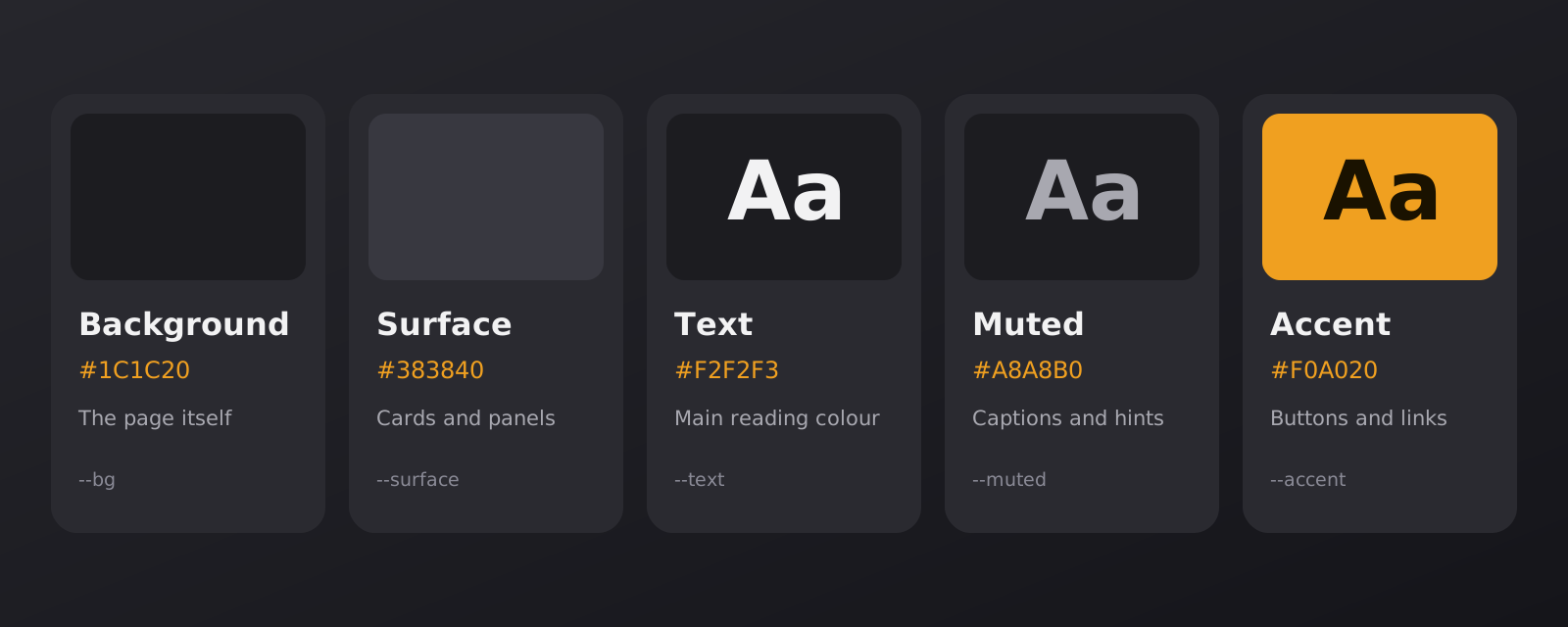
Five colour roles: background, surface, text, muted text and accent, each with a sample and a HEX code
The five roles every theme in the gallery uses.
  • Background: the page itself, the colour that fills the screen.
  • Surface: cards, panels and inputs. In a dark theme it is a step lighter than the background, and in a light theme a step darker.
  • Text: the main reading colour for body copy and headings.
  • Muted: secondary text such as captions, hints and dates.
  • Accent: buttons, links and focus marks, the one colour that should stand out.

Choosing a dark palette

Avoid pure black and pure white together. That pair gives the highest possible contrast, 21:1, and on a dark screen the bright letters can glow and blur. A soft light grey on a deep grey is easier to read for a long time. For body text, a ratio between about 10:1 and 15:1 is comfortable, and muted text should stay at 4.5:1 or higher.

Tint matters too. A slightly warm or slightly cool dark feels calmer than a neutral one, which is why the gallery has charcoal, green, blue and plum backgrounds. OLED phones are the exception: a near-black background like Warm Coal saves battery and looks deep, as long as the text stays soft.

Choosing the accent

An accent for buttons and icons should reach at least 3:1 against the background. If you also use it for text links, aim for 4.5:1. Check the text on the button as well: Midnight Amber uses dark text on the amber button, while a deep accent such as Lavender takes white text.

Light palettes still matter

A bright room, a printed page or a reader who sees better on a light screen all call for a light theme. The light palettes here avoid pure white and use warm or cool off-whites, which reduces glare while keeping the text sharp. Sepia and Paper are good for reading in the evening, and Cloud suits dashboards and documents.

Check before you ship

A palette on a swatch is not the same as a palette on a real page. Put your text on it, look at it on a phone as well as a monitor and measure the pairs you use most. The Contrast Checker does the maths, our guide on checking contrast for dark themes shows the steps, and the article on contrast in dark themes explains why the numbers matter.

Frequently Asked Questions

Quick answers about the palettes, copying and contrast.

What do the five colours in each theme do?

Every theme uses the same five roles. Background is the page itself, and surface is the colour of cards and panels that sit on it. Text is the main reading colour, muted is for captions and hints, and accent is for buttons, links and focus marks. Keeping the roles the same makes it easy to swap one theme for another.

How do I copy a theme?

Click any colour to copy its HEX value, or press Copy CSS under a theme to copy all five colours as CSS variables. Paste them into your stylesheet and use them with var(--bg), var(--text) and so on. Copying happens in your browser, and nothing is sent to us.

What does the contrast number mean?

It is the contrast ratio between the text colour and the background colour, calculated with the WCAG formula. A ratio of 4.5:1 meets level AA for normal text and 7:1 meets level AAA. Every theme here is above 7:1 for main text. You can test other pairs in the Contrast Checker.

Can I use these palettes on my own site?

Yes. They are plain colour values, so use them as they are or change them to suit your design. Always test the result with your own fonts, sizes and content, because contrast depends on all three.

Do the themes change this website or the extension?

No. The gallery is a reference for colours and does not change how this website or the extension looks. To use a palette, copy it into your own project or theme settings.

Why are there light themes on a dark-mode website?

Dark mode is a choice, not a rule. In a bright room, in print or for people who read better on a light page, a soft light palette is the better tool. We include both so you can compare them side by side and pick what is comfortable for your eyes.

Can I suggest a theme?

Yes. Send your colours and a short description through the contact form, and tell us what the palette is meant for, such as long reading, code or a notes page.

Want to test your own colours?

Enter any text and background pair, see the contrast ratio and preview it on a dark page before you use it.